You find a channel with 800 subscribers, click a video, and an ad plays before it. So that channel is making money, right? Or you open your own video, see an ad on it, and assume your earnings have started.
Both assumptions can be wrong. Ads showing on a video do not prove the channel earns anything from them.
The short answer: to check if a YouTube channel is monetized, there are two different jobs. For your own channel, YouTube Studio tells you the truth: the Earn page shows your Partner Program status, and the Content list shows a monetization icon for every video. For someone else’s channel, there is no public on/off switch to look at. A Join button or Super Thanks is the strongest public clue, but it can mean the lower 500-subscriber level, which pays no ad money at all.
This guide covers both, explains why ads mislead so many people, and shows what a monetized channel of a given size might actually earn.
Check your own channel in YouTube Studio (4 steps)
This takes two minutes and gives you a definite answer.
- Open YouTube Studio on a computer and click “Earn” in the left menu. This is the one place that states your Partner Program status. If you’ve been accepted, you’ll see your earnings and your accepted terms. If you haven’t, you’ll see your progress toward the requirements instead. YouTube says a review after you apply typically takes about a month.
- Click “Content” and look at the Monetization column. Each video has an icon showing whether it can run ads (YouTube Help). This column only appears once you’re in the Partner Program.
- Use the filter at the top of the Content list. You can filter to Monetized, Not monetized or Limited to see the problem videos in one view, instead of scrolling the whole list.
- Check your Shorts separately. A gray icon on Shorts usually means you haven’t accepted the Shorts Monetization Module in your terms. Accepting it switches that on.
Here’s what the icons mean:
| What you see | What it means | What to do |
|---|---|---|
| Green icon | The video can run most ads | Nothing |
| Yellow icon | Limited ads, usually an advertiser-suitability issue | Open the video and check the details; you can request a review |
| Gray icon on a Short | The Shorts Monetization Module isn’t accepted | Accept it in the Earn tab’s terms section |
| No Monetization column at all | Your channel isn’t in the Partner Program yet | See the Earn page for your progress |
One caution: YouTube does rename and move things in Studio from time to time. If a label looks slightly different from the names above, look for the nearest equivalent rather than assuming something is broken.
How to check if someone else’s channel is monetized
Here it gets harder, and most articles overstate what you can tell. YouTube used to leave a flag in a page’s source code that revealed monetization status, and around November 17, 2023 that was removed (reported by Cord Cutters News, citing Wired). There is no reliable replacement.
What you have left are clues. Some are useful, some prove nothing at all.
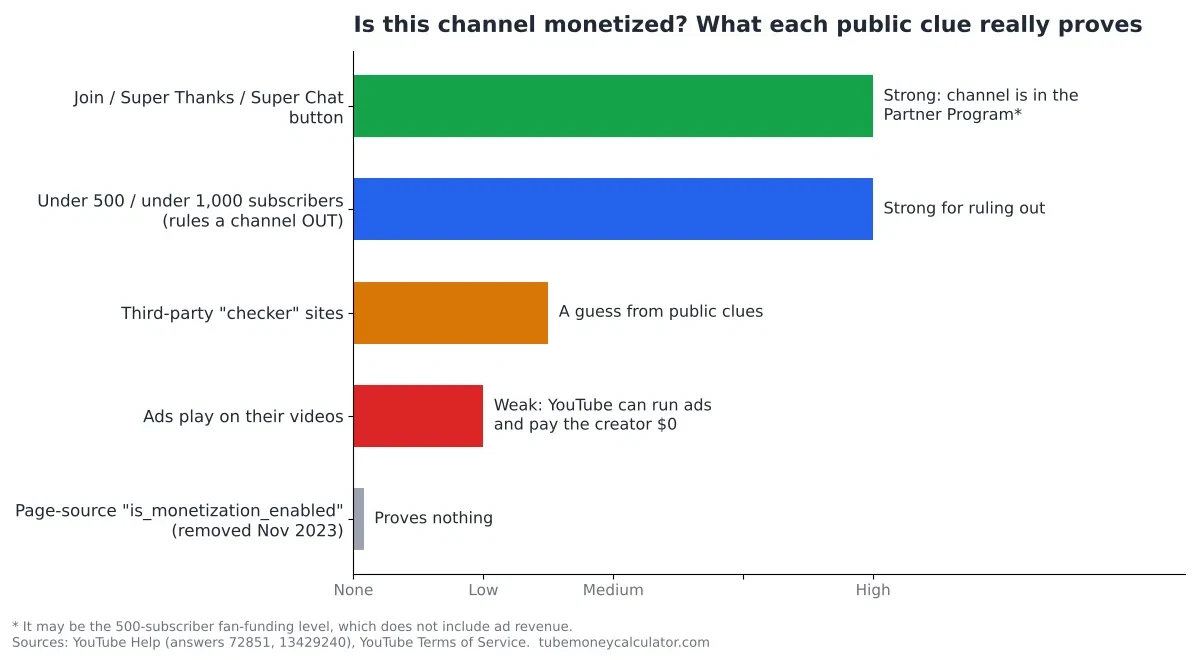
Clue 1: Ads on the video — proves nothing
This is the big one. YouTube’s own Partner Program page says channels not in the Partner Program may still show ads, and those channels get no share of the revenue. YouTube’s Terms of Service have included a “Right to Monetize” since late 2020, which lets YouTube run ads on any video on the platform.
There’s a second reason ads mean nothing: Content ID claims. If a video uses music or footage someone else owns, the rights holder can choose to run ads on it and take the revenue (YouTube Help). The ad you see could be paying a record label, not the creator.
So: an ad tells you an ad ran. Nothing more.
Clue 2: A Join button, Super Thanks or Super Chat — the strongest clue
These features are only available to channels inside the Partner Program, so seeing one is real evidence. But be careful what you conclude. The program has a lower level that needs only 500 subscribers, 3 public uploads in the last 90 days, and 3,000 watch hours in 12 months (or 3 million Shorts views in 90 days). That level includes memberships, Super Chat, Super Stickers, Super Thanks and YouTube Shopping — and no ad revenue (YouTube Help).
So a Join button proves the channel is in the program. It does not prove the channel earns from ads.
Clue 3: Subscriber count — useful for ruling out
You can’t confirm monetization from subscribers, but you can often rule it out. Under 500 subscribers means neither level is open. Under 1,000 means ad revenue sharing isn’t, though the fan-funding level might be. Watch hours aren’t public, so this only ever works as a “no,” never as a “yes.”
Clue 4: The old page-source trick — dead
You’ll still find tutorials telling you to open a video’s page source and search for a monetization flag. That flag was removed in November 2023. Any guide still recommending it hasn’t been updated.
Clue 5: “Monetization checker” websites — guesses
Tools that claim to tell you whether a channel is monetized are inferring it from public signals, the same ones listed above. They can’t see YouTube’s internal status. Treat their answers as guesses, not facts.
| Clue | What it proves | Reliability |
|---|---|---|
| Ads play on the video | Nothing about the creator’s earnings | None |
| Join / Super Thanks / Super Chat | The channel is in the Partner Program, at some level | High |
| Under 500 subscribers | The channel is not in the program | High (as a “no” only) |
| Page-source monetization flag | Nothing — removed in Nov 2023 | None |
| A “monetization checker” site | Someone else’s guess | Low |
“Monetized” can mean three different things
Most arguments about whether a channel is monetized are really people using one word for three situations:
- Not in the Partner Program. The creator earns nothing from YouTube. Ads may still appear on their videos, and YouTube keeps that money.
- The fan-funding level (500 subscribers). Memberships, Super Chat, Super Stickers, Super Thanks and Shopping. Money comes from viewers and buyers, not advertisers.
- Ad revenue sharing (1,000 subscribers). Plus 4,000 qualified watch hours in 12 months or 10 million qualified Shorts views in 90 days. This is the level where the creator earns a share of ad and YouTube Premium money: 55% of net ad revenue on long-form videos (YouTube Help).
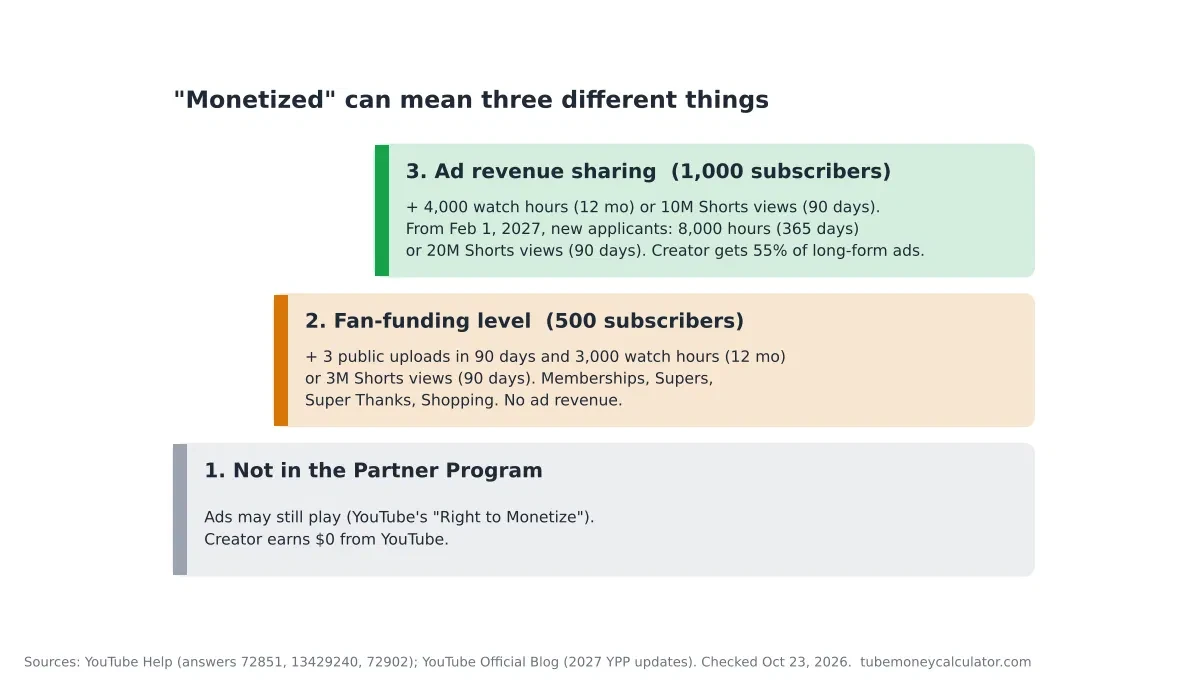
When someone says “that channel is monetized,” they usually mean level 3. The public clues mostly can’t tell levels 2 and 3 apart.
What changes on February 1, 2027
If you’re checking your own progress, the target is about to move for new applicants.
- New applicants for ad and Premium revenue will need 1,000 subscribers plus 8,000 qualified watch hours in the last 365 days, or 20 million qualified Shorts views in the last 90 days.
- Channels already in the program are not affected by the new entry bar.
- Shorts revenue will need 10 million qualified Shorts views in the last 90 days. Below that, a channel stays in the program and keeps earning on long-form, but its Shorts share pauses.
- The fan-funding and Shopping level is unchanged.
- Existing partners must accept the updated terms in YouTube Studio by January 31, 2027.
That third point matters for this article: after February 1, a channel can be genuinely monetized and still earn $0 from its Shorts. We cover the detail in YouTube’s 10 million Shorts views rule, and every change in YouTube Partner Program changes in February 2027.
If a channel is monetized, what could it earn?
Once you know a channel is earning, the next question is always “how much?” Nobody outside YouTube and the creator can know the real figure, but you can estimate a range from views, niche and audience country. These use our methodology:
A US tech channel, 50,000 views a month, videos under 8 minutes
- Low RPM: $8 CPM × 1.00 (US) × 40% monetized views × 55% creator share = $1.76 per 1,000 views
- High RPM: $22 × 1.00 × 60% × 55% = $7.26
- Monthly: 50 × $1.76 to 50 × $7.26 = about $88 to $363
A Canadian gaming channel, 100,000 views a month, videos 8 minutes or longer
- Low RPM: $2 × 0.85 (Canada) × 40% × 55% × 1.5 (mid-roll boost) = $0.56
- High RPM: $8 × 0.85 × 60% × 55% × 1.5 = $3.37
- Monthly: 100 × $0.56 to 100 × $3.37 = about $56 to $337 (the unrounded RPMs are $0.561 and $3.366)
Shorts, 1 million US Shorts views a month
- At $0.03 to $0.15 per 1,000 views: about $30 to $150 — but $0 if the channel isn’t in the program, or, from February 1, 2027, if it’s under the 10 million Shorts views rule.
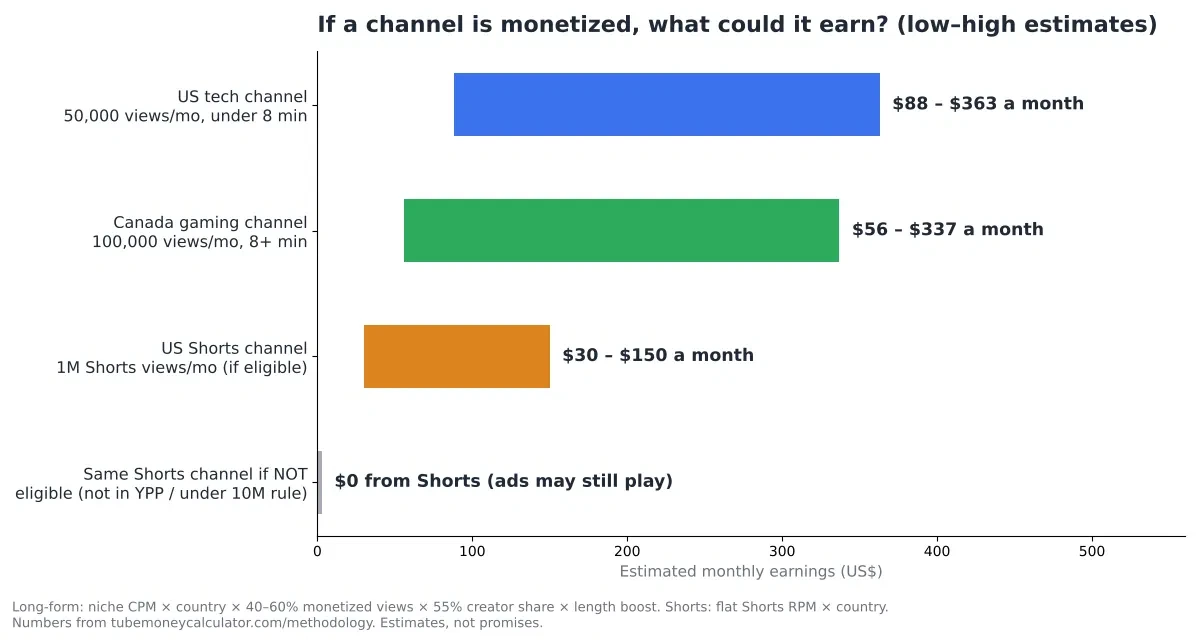
These are estimates, not promises. Real earnings depend on the audience, the topic and the time of year. To run your own numbers, use the earnings calculator. And if you’re wondering when money actually arrives, see how YouTubers get paid.
FAQ
Do ads mean a channel is monetized?
No. YouTube can run ads on videos from channels that aren’t in the Partner Program, and those channels receive no share of the revenue. Ads can also come from a Content ID claim, where the rights holder takes the money. Ads are the least reliable clue there is.
Can I see another channel’s earnings?
No. Earnings are private, visible only to the creator in YouTube Studio and AdSense. Any site showing a specific creator’s income is estimating from public view counts, usually with a very wide margin of error.
Why is my video’s monetization icon yellow?
Yellow means limited ads, usually because the video was judged not suitable for all advertisers. Open the video in Studio to see the reason given, and request a review if you think it’s wrong.
Can a channel lose monetization?
Yes. Channels can be removed for policy violations, and from February 1, 2027, there’s also an activity rule — a channel needs some combination of recent watch hours, Shorts views or uploads to stay active. Partners also need to accept the updated terms by January 31, 2027 to keep earning from the features those terms cover.
Your next step
If it’s your own channel, open YouTube Studio and click Earn right now — that one page settles the question. If you’re looking at someone else’s, check for a Join button or Super Thanks and remember what it does and doesn’t prove.
Either way, once you know a channel is earning, put its monthly views, niche and audience country into the YouTube Money Calculator to see a realistic range. That’s a far better guide than any “monetization checker.”