You paste a channel’s name into one earnings checker and get “$250 to $4,000 a month.” You try a second tool and get something else. A third says the channel earns nothing at all. Which one is right, if any?
The short answer: no calculator can show a channel’s real YouTube earnings, because revenue is private. It appears only inside that channel’s own YouTube Studio. “Earnings calculator by channel name” tools read public numbers such as views, multiply them by a flat rate, and show a range. That’s why they disagree so much. For a better estimate, split the channel’s Shorts from its long videos, pick the niche, the main audience country and the video length, then run each part separately. The steps are below.
What a “by channel name” calculator actually does
Most tools follow the same three steps:
- Read public data. They look up the channel’s total views, its subscriber count and recent uploads.
- Multiply by a flat rate. The rate is usually a single number applied to every view, whatever the video is.
- Show a range. The low and high ends come from the rate range the tool chooses.
Social Blade, for example, applies a low rate of $0.25 and a high rate of $4.00 per 1,000 daily views, and says it “assumes that every view on the channel is monetized” (Social Blade help). We look at that method in detail in how accurate Social Blade’s earnings estimate is.
Here’s how the common types compare:
| Type of tool | What it reads | What it misses |
|---|---|---|
| Flat-rate checker (for example, Social Blade) | Public views and subscribers | Niche, country, video length, the Shorts split and whether the channel is monetized |
| Advertiser-rate page | Public views × an average advertiser payment | YouTube’s 45% share, the creator’s 55% share, monetization status and length |
| Split estimate (our method, below) | Views you split into Shorts and long videos, plus niche, country, length and month | Real revenue, Premium money, memberships and sponsorships |
Some tools work from a different number altogether. One page we reviewed cites an average advertiser payment of $0.018 per view. That’s what advertisers might pay, before YouTube takes its share, and it isn’t what a creator receives. Treat any tool that doesn’t say which figure it uses with caution.
What these tools can see, and what they can’t
The split matters more than anything else in this article.
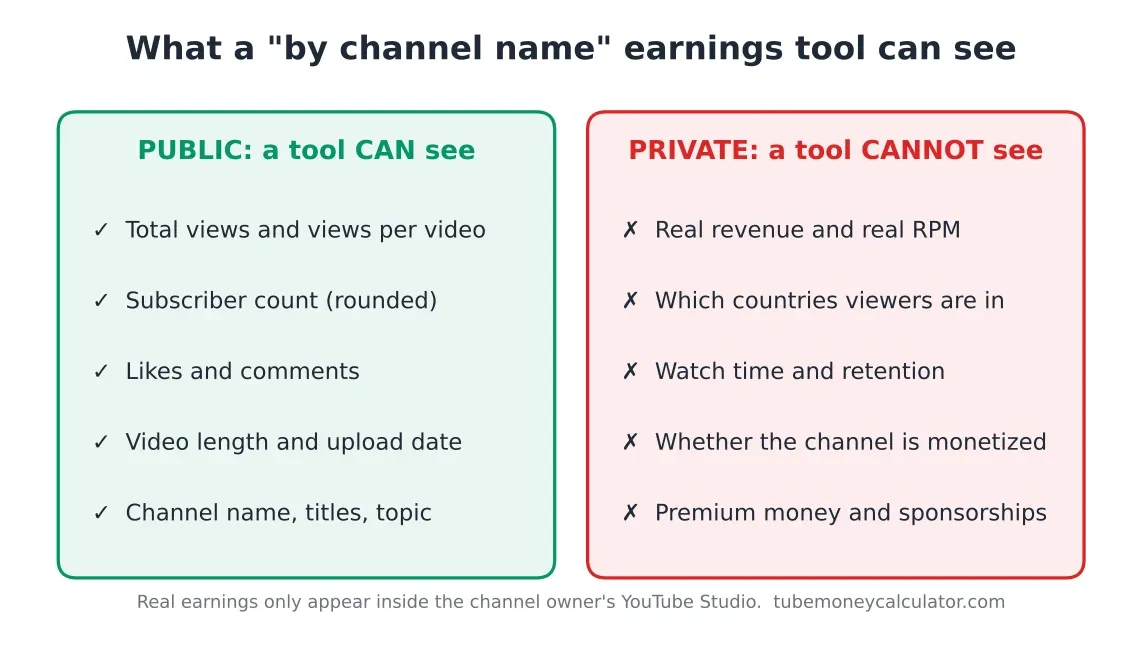
Public, so a tool can read it:
- Total views and views per video
- A subscriber count. YouTube shortens it for display, so 1,234 subscribers shows as 1.23K, and the displayed figure only changes at set intervals (YouTube Help)
- Likes and comments
- Video length and upload date
- The channel name, titles and topic
Private, so no outside tool can read it:
- Real revenue and RPM
- Which countries the viewers are in
- Watch time and retention
- Whether the channel is monetized at all
- Premium money, memberships and sponsorships
YouTube’s permission system explains the private side. The Viewer role is the one the Help page names as able to see revenue data. Limited roles, such as Viewer (Limited) and Editor (Limited), are listed as unable to access it (YouTube Help). A stranger on the internet has no channel role at all, so their checker can’t see revenue.
Four reasons the number can be way off
1. Shorts are mixed in with long videos. A channel with millions of Shorts views can look rich to a tool that treats every view the same. Shorts pay from a shared pool at a fraction of long-form rates. Our methodology puts US Shorts at $0.03 to $0.15 per 1,000 views, against $2.64 to $10.89 for a US tech video of 8 minutes or longer.
2. Niche and country are ignored. Advertisers pay more for some audiences than others. A finance channel and a music channel with the same views can differ by several times over. A Canadian audience is counted at 0.85 of the US rate in our model.
3. Video length is public but rarely used. The length of each video is visible to anyone, and it matters. Videos of 8 minutes or longer can carry mid-roll ads, which the methodology rewards with a 1.5× boost. Most flat-rate tools ignore it.
4. The channel may not be monetized at all. A tool can show money for a channel that isn’t in the YouTube Partner Program. The channel may still have ads on its videos, but YouTube keeps that revenue. Our guide on how to check if a channel is monetized explains the difference.
How to estimate any channel’s earnings yourself (6 steps)
You can’t see a channel’s real earnings, but you can make a much tighter estimate from public data and a few assumptions.
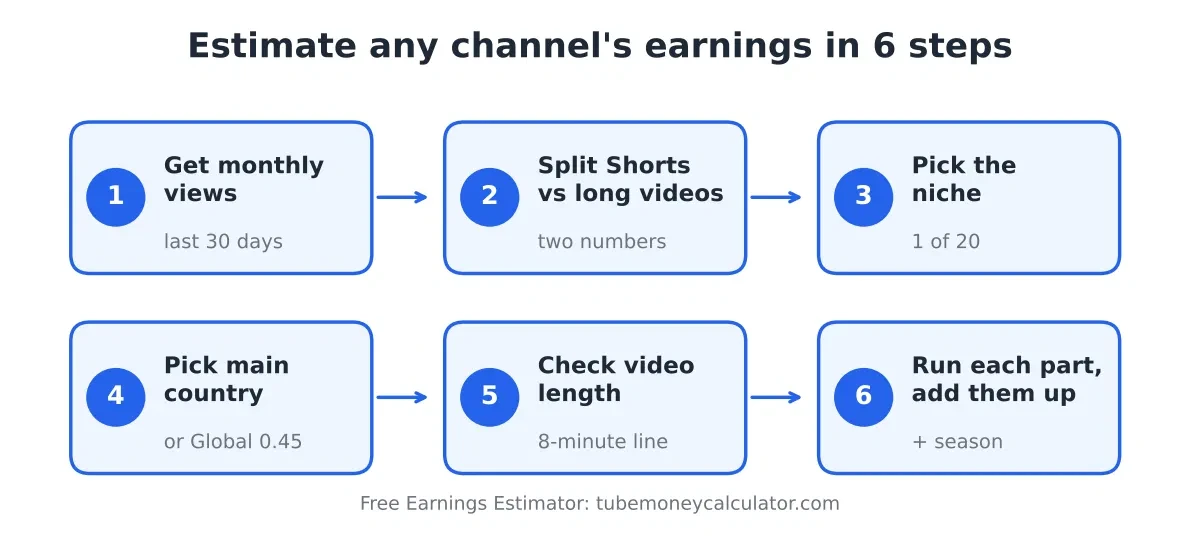
- Get the monthly views. Use the channel’s views over the last 30 days. Public counts are the best data you have, so use the same window for every channel you compare.
- Split Shorts from long videos. Shorts views are the ones on the Shorts tab. Long-video views are the rest. Keep these as two separate numbers.
- Pick the niche. Choose the closest category from the calculator’s list. Technology, finance and business pay more per view than gaming, music or comedy.
- Pick the main audience country. If you know it, use it. If you don’t, use the calculator’s “Global average / mixed audience” setting, which is a fixed 0.45 and gives a rough floor. Our RPM by country article explains why the country matters.
- Check the typical video length. Look at the channel’s recent long videos. Are they 8 minutes or longer? That decides whether the mid-roll boost applies.
- Run each part, add them up, then adjust for the month. Run the long videos and the Shorts separately, add the two results, and apply the season if you want a monthly view.
Your result is a range. Treat it as a planning number, not a payout.
Worked example 1: a US tech channel with 1 million views a month
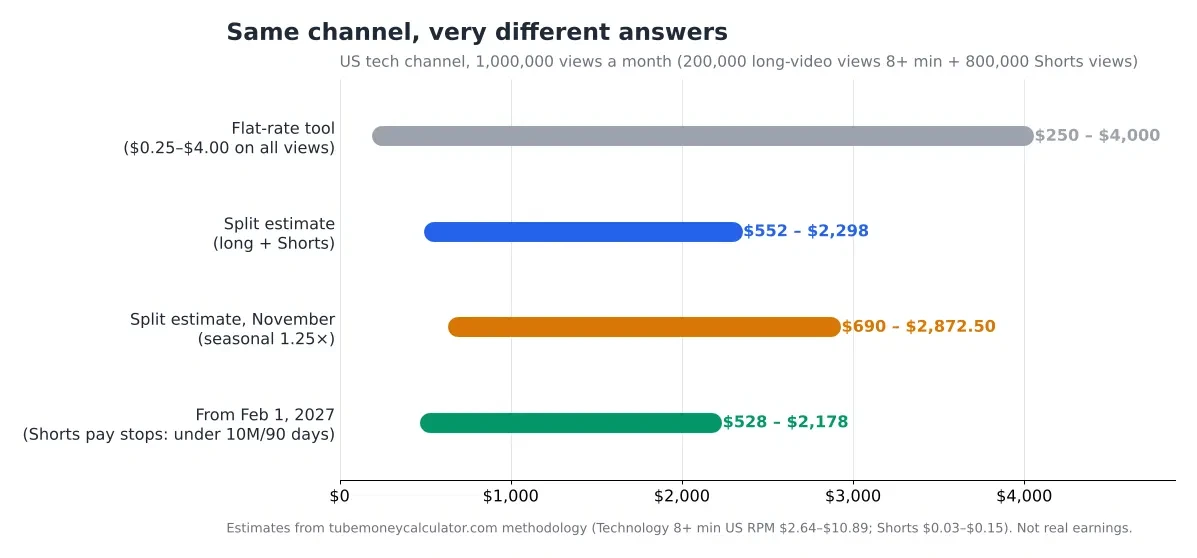
Say a channel gets 1,000,000 views a month: 200,000 on long videos of 8 minutes or longer, and 800,000 on Shorts. Its niche is technology and its audience is in the US.
A flat-rate tool applies one rate to all 1,000,000 views and shows $250 to $4,000. That range is wide and doesn’t reflect the Shorts split or the length.
A split estimate runs each part separately:
- Long videos, 8+ min: 200 × $2.64 = $528 low, 200 × $10.89 = $2,178 high
- Shorts: 800 × $0.03 = $24 low, 800 × $0.15 = $120 high
- Total: $552 to $2,298 a month
With the November season (1.25×), the same channel’s split estimate rises to 552 × 1.25 = $690 low and 2,298 × 1.25 = $2,872.50 high.
From February 1, 2027, Shorts pay depends on the 10 million qualified Shorts views rule. At 800,000 Shorts views a month, the channel reaches 2.4 million in 90 days, well below 10 million. Its Shorts share would pause at $0. The estimate then falls to the long-form part alone: $528 to $2,178 a month. The channel still earns, just not from Shorts. YouTube’s official announcement covers the rule (YouTube Blog).
If the audience is mostly outside the US, the Global average of 0.45 would apply to the long-form part: 200 × $2.64 × 0.45 = $237.60 low and 200 × $10.89 × 0.45 = $980.10 high.
Worked example 2: one Canadian cooking video from its link
You paste a single video’s link into a tool. It has 120,000 views and it’s a Canadian cooking video. Food & cooking has a US RPM of $1.32 to $5.94 for videos of 8 minutes or longer, and $0.88 to $3.96 under 8 minutes. Canada is counted at 0.85.
If the video is 12 minutes:
- Low: $1.32 × 0.85 = $1.122 per 1,000 → 120 × $1.122 = $134.64
- High: $5.94 × 0.85 = $5.049 per 1,000 → 120 × $5.049 = $605.88
If the same views were on a 7-minute video, the mid-roll boost wouldn’t apply:
- Low: $0.88 × 0.85 = $0.748 per 1,000 → 120 × $0.748 = $89.76
- High: $3.96 × 0.85 = $3.366 per 1,000 → 120 × $3.366 = $403.92
A flat-rate tool at $0.25 to $4.00 per 1,000 views shows $30 to $480 for the same 120,000 views. It can’t tell a 7-minute video from a 12-minute one.
The $0.018-per-view figure from the advertiser-payment tool gives 120,000 × $0.018 = $2,160. That’s the advertiser side, before YouTube’s share, so it overstates what the creator would keep by a wide margin.
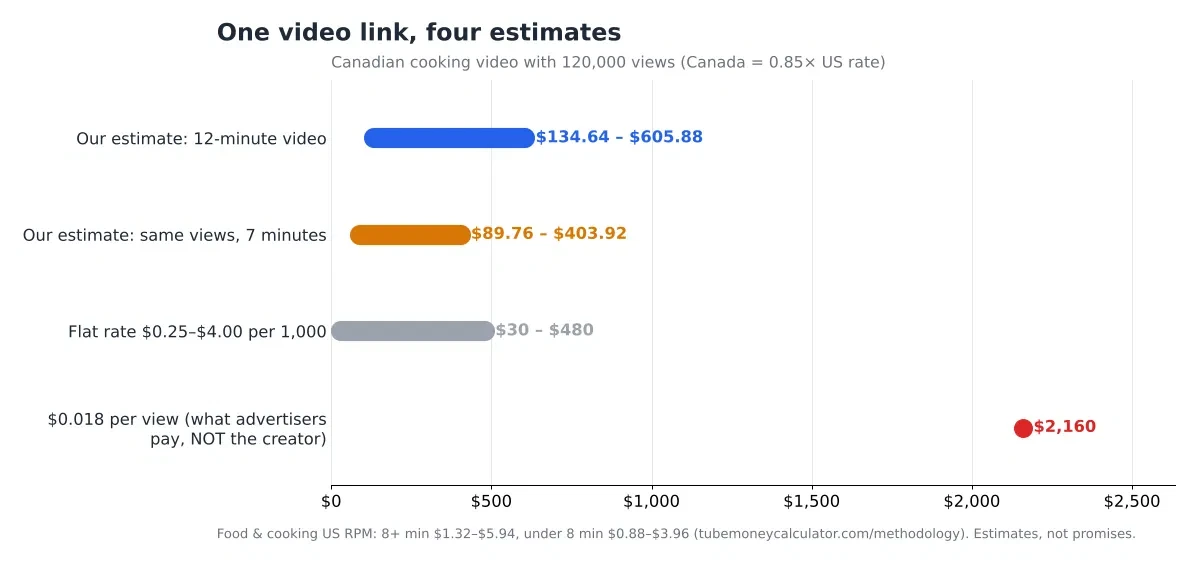
The lesson is the same as before: length and country change the answer far more than a flat rate can show.
Is there any way to see a channel’s real earnings?
Only through the people who own the channel. The practical routes are:
- Ask the creator for a screenshot of their Studio Analytics, Revenue tab, for a period you name. Many creators will share it for a brand deal.
- Ask for a media kit with views per video, average view duration and audience countries. It isn’t revenue, but it’s the inputs for the estimate above.
- Use a channel permission only if the owner gives you one. Viewer is the role that can see revenue data. Limited roles can’t.
Don’t rely on any tool that claims to show real revenue from a public name. For sponsorship talks especially, asking for the data beats guessing from a checker.
FAQ
Is there a calculator that shows a channel’s exact earnings?
No. Revenue is visible only inside the channel’s YouTube Studio and to people with the right channel permissions. Any tool that gives a single exact figure for someone else’s channel is guessing.
Can I see how much a video made from its link?
No, not its real earnings. You can estimate it from the video’s views, length, niche and country, which is what the second worked example does.
Why do the tools disagree so much?
They use different rates, different inputs and different assumptions. Some apply one rate to every view. Some ignore Shorts. Some ignore length or country. Compare the method first, then the number.
Does subscriber count change the estimate?
Not in our method. Pay comes from views and RPM. Subscribers can show audience size and loyalty, but the calculator’s estimate runs on views, niche, country, length and format.
Do these tools work for Shorts-only channels?
The honest answer is that they work poorly. A Shorts-only channel earns from a shared pool at a much lower rate, and from February 1, 2027 it also needs 10 million qualified Shorts views in 90 days to share in that pool at all. Use the Shorts line in the calculator, and don’t trust a flat-rate tool to get it right.
Your next step
Pick one channel you’re curious about. Get its last-30-day views, split them into Shorts and long videos, and run both parts through the Earnings Estimator. Then compare the range with the flat-rate tool you used before. The gap will show you how much the method matters.
All calculator figures are estimates from our published methodology, not official YouTube rates. Third-party tools are described as they publish their own methods, as of November 1, 2026. Their methods may change. YouTube’s rules were checked on the same date and may change before February 2027.