Your video spreads. Views jump from 20,000 to 60,000 in a month, and your YouTube earnings barely move. What happened? The most likely answer is YouTube RPM by country: the ad price depends on where the viewer is, not where you live. Views from the US sell for far more than views from India, so a flood of international views can add traffic without adding much money.
The short answer: advertisers pick the markets they want to reach, so ad prices change with the viewer’s country. In our calculator, a US view is worth 1.00, a Canadian view 0.85 and an Indian view 0.09. To estimate a mixed audience, weight each country’s multiplier by its share of your views, add them up, and apply that blended number to your RPM. Taken on the same technology video, that’s the difference between about $2.64 and $10.89 per 1,000 views for the US, and about $0.24 to $0.98 for India.
Why does the viewer’s country change what YouTube pays?
Ad prices are set in a market, and markets differ. YouTube’s own help page says it plainly: “CPMs will vary by geography.” It explains that different locations have different levels of competition in the ad market, and that advertisers choose their target regions (YouTube Help).
The same page adds a second effect. Viewer geography can also decide whether a view shows an ad at all. So a country can lower your RPM twice: fewer advertisers bidding, and fewer views getting an ad.
Notice what this does not depend on: your own country. A creator in Canada whose audience is mostly in India earns at India’s rates, not Canada’s.
YouTube RPM by country: the numbers the calculator uses
Here are the multipliers from our methodology page, applied to a US technology video of 8 minutes or longer. The range is the low and high RPM per 1,000 views, and the last column shows how many views from each country equal 1,000 US views in value.
| Country | Multiplier | RPM, US tech 8+ min (low to high) | Views equal to 1,000 US views |
|---|---|---|---|
| United States | 1.00 | $2.64 – $10.89 | 1,000 |
| Australia | 0.90 | $2.38 – $9.80 | about 1,111 |
| United Kingdom | 0.88 | $2.32 – $9.58 | about 1,136 |
| Canada | 0.85 | $2.24 – $9.26 | about 1,176 |
| Germany | 0.80 | $2.11 – $8.71 | 1,250 |
| Global average / mixed audience | 0.45 | $1.19 – $4.90 | about 2,222 |
| Mexico | 0.20 | $0.53 – $2.18 | 5,000 |
| Brazil | 0.18 | $0.48 – $1.96 | about 5,556 |
| Philippines | 0.11 | $0.29 – $1.20 | about 9,091 |
| India | 0.09 | $0.24 – $0.98 | about 11,111 |
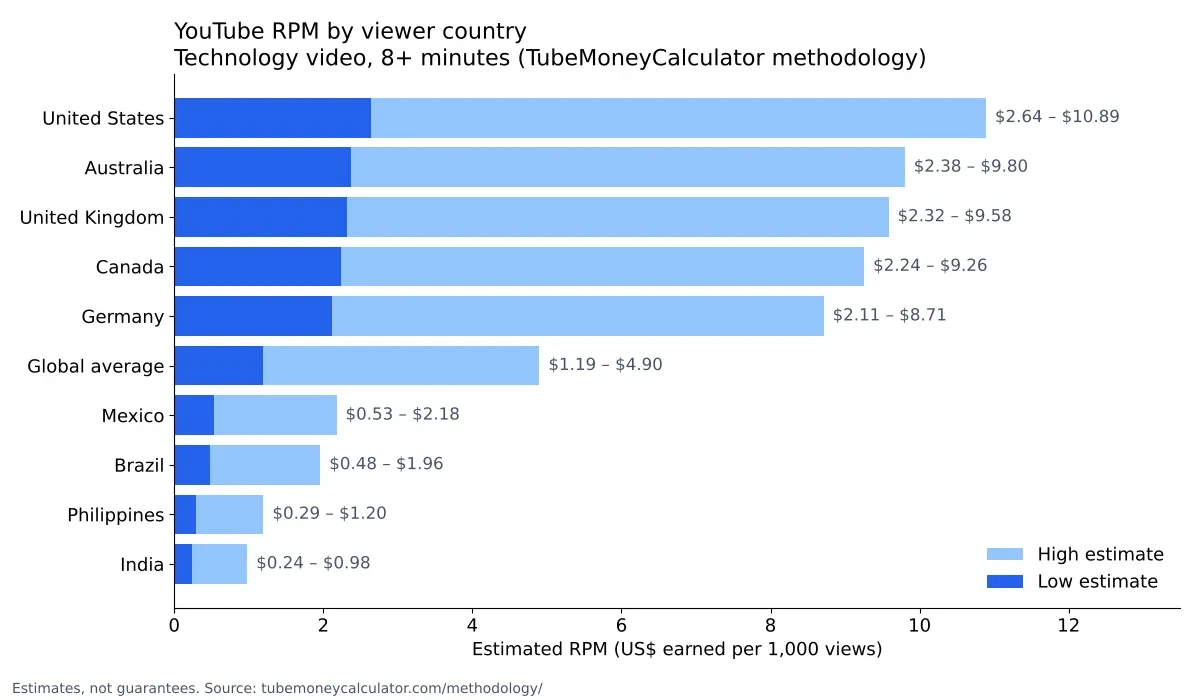
If RPM is still new to you, YouTube RPM explained covers the basics. The method behind each row is the same one used throughout our estimates. RPM is the niche’s ad rate, multiplied by the country multiplier, by the share of views that show an ad (40% low, 60% high), by your 55% creator share, and by the length boost for 8-minute-plus videos (1.5×). The formula for each country is identical except for that one multiplier.
Put the other way round: a US view is worth about 11 times an Indian view at the high end ($10.89 ÷ $0.98 ≈ 11), and about the same at the low end ($2.64 ÷ $0.24 = 11).
How to check your own revenue by country in YouTube Studio
Before you estimate anything, check what your real audience is paying. YouTube’s Advanced mode breakdown steps describe this route:
- Sign in to YouTube Studio and select Analytics from the left menu.
- Open Advanced mode (or select See more under a report).
- In the left panel, open the Breakdown box and choose geography.
- Open the Metrics box and add a revenue metric.
- Use Filters if you want to narrow the data to one video or period.
- Select Export current view to save the table.
YouTube’s Help page notes that its Studio layout has been updated, so menu names may differ slightly from these. If you can’t find a name exactly, look for the nearest equivalent under Analytics. For the full revenue reports, see how to see your YouTube earnings in Studio.
Once you have the country split, you have the inputs for a mixed-audience estimate.
How to estimate earnings for a mixed audience (4 steps)
- Get your country shares. Use the geography breakdown in Studio, or your best estimate from it. Shares should add up to 100%.
- Multiply each share by that country’s multiplier. Use the table above.
- Add the results together. The total is your blended multiplier.
- Apply it to your RPM. Use the calculator’s US or niche range, multiply by the blended multiplier, and then by your views.
In the calculator, you set one country at a time, so run it with the United States and multiply the result by your blended multiplier. Remember that the calculator’s “Global average / mixed audience” option is a single fixed 0.45 and is not a substitute for your own blend.
Worked example 1: a US tech channel with a mixed audience
A US technology channel gets 100,000 views a month, split like this: 60% United States, 15% Canada, 10% United Kingdom, 15% India.
| Country | Share × multiplier | Result |
|---|---|---|
| United States | 60% × 1.00 | 0.600 |
| Canada | 15% × 0.85 | 0.1275 |
| United Kingdom | 10% × 0.88 | 0.088 |
| India | 15% × 0.09 | 0.0135 |
| Blended multiplier | 0.829 |
Now apply it to the US tech range:
- Blended low RPM: $2.64 × 0.829 = $2.19
- Blended high RPM: $10.89 × 0.829 = $9.03
- Monthly, low: 100 × $2.64 × 0.829 = $218.86
- Monthly, high: 100 × $10.89 × 0.829 = $902.78
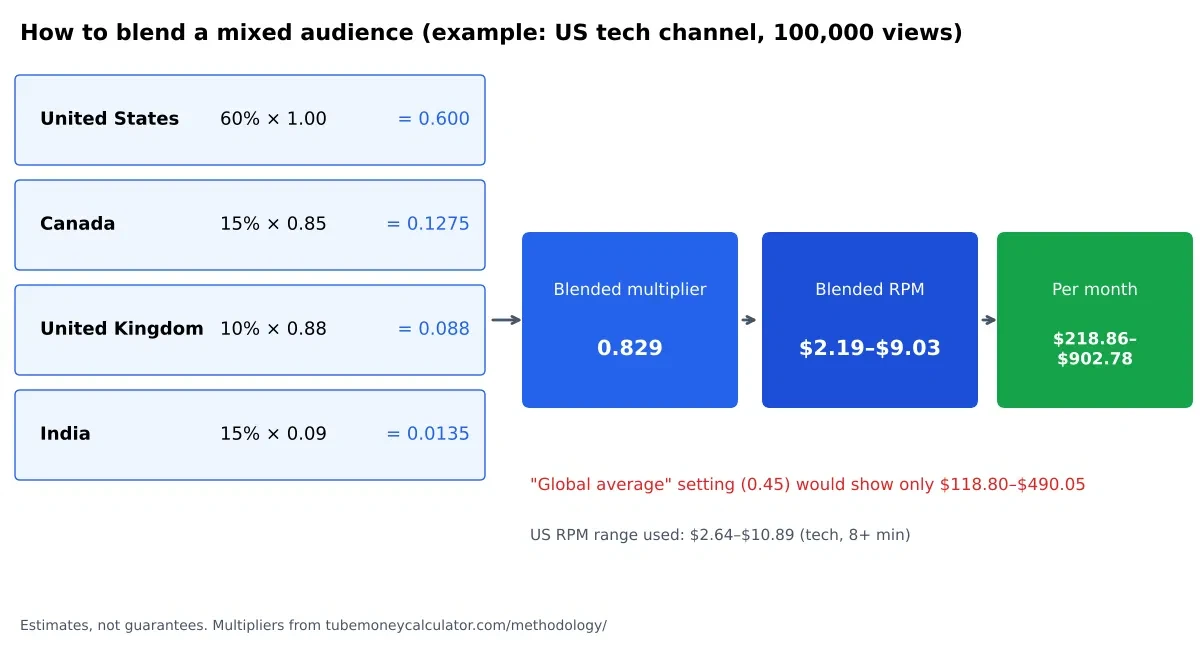
For comparison, the calculator’s “Global average / mixed audience” setting (0.45) would show only $118.80 to $490.05 for the same views. That setting is a rough floor for an unknown audience, not an estimate for yours. If you know your country mix, the blend gives a much closer answer.
Why your views went up but your money didn’t
This is the trap that catches creators whose videos spread abroad. Here’s a Canadian cooking channel, using 8-minute-plus videos.
Worked example 2: a normal month, then a viral month
Normal month: 50,000 views, split 70% Canada, 20% United States and 10% Philippines. Cooking RPM for 8+ minute videos runs from $1.32 to $5.94 before the country multiplier.
- Blended multiplier: 0.70 × 0.85 + 0.20 × 1.00 + 0.10 × 0.11 = 0.806
- Blended RPM: $1.32 × 0.806 = $1.064 low, $5.94 × 0.806 = $4.787 high
- Monthly: 50 × $1.064 = $53.20 low, 50 × $4.787 = $239.38 high
Viral month: a video spreads and adds 100,000 views from India. Each Indian view is worth 0.09 of a US view, so those extra views add:
- Low: 100 × $1.32 × 0.09 = $11.88
- High: 100 × $5.94 × 0.09 = $53.46
Add them to the normal month, and the totals are:
- Views: 50,000 → 150,000, up 200%
- Earnings: $53.20 to $239.38 → $65.08 to $292.84, up only 22%
- RPM: falls to about $0.43 to $1.95 per 1,000 views
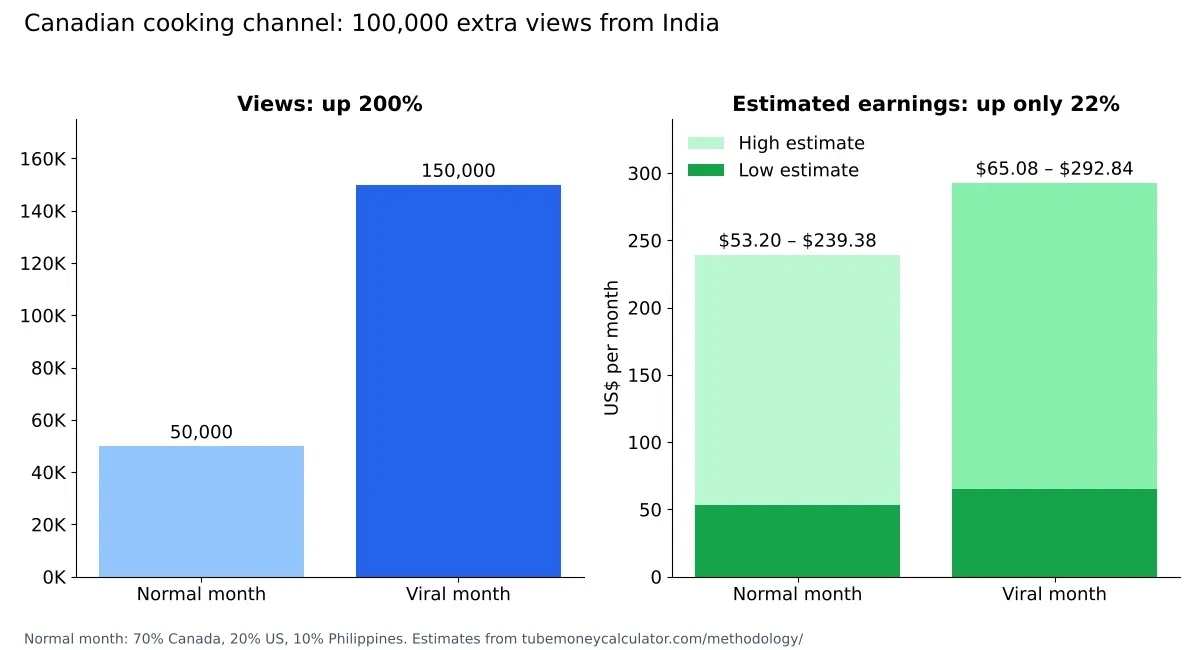
Nothing went wrong with the channel. The extra views were real and still earn something. They just come from a market that pays less per view, so the total rises far less than the view count.
What to do about it
- Know your blend. Check the geography breakdown in Studio every few months, so you know which countries your views really come from.
- Choose topics and titles for the markets that pay. If your best-paying viewers are in the US and Canada, write for them: examples, prices and references that work there.
- Don’t fight international viewers. They still add watch hours, subscribers and community. A view from India is not wasted, it’s just worth less in ad money.
- Add income that doesn’t depend on ad prices. Memberships, Super Thanks and sponsorships are paid by viewers or brands directly. Our guide to how to make money before 8,000 watch hours covers the options.
- Plan for the season too. Ad prices also move by month. See why YouTube earnings drop in January for the pattern.
Avoid anything that promises to change your audience’s location, including buying geo-targeted views or using a VPN. Views bought this way break YouTube’s rules and risk your monetization. The plain fact is that ad prices follow the viewer, so the honest lever is the audience you actually attract.
FAQ
Does my own country set my YouTube RPM?
No. Ad prices depend on where the viewers are. A creator in Canada whose audience is mostly in the US earns at US rates for those views. Your own country mostly matters for your taxes and payment setup, not for the ad price on each view.
Do Shorts follow the same country pattern?
Shorts are paid from a shared pool, not per-video ads, so the simple country multiplier doesn’t map onto them the same way. YouTube hasn’t published Shorts country rates, so treat any Shorts country estimate as uncertain. Our methodology lists a single US Shorts range.
Should I stop getting international viewers?
No. International viewers add watch hours, subscribers and reach. They pay less per view, but that doesn’t make them worthless. Focus on what your higher-paying audience wants, and keep the rest of the audience happy too.
Can I change where my viewers come from?
Not directly, and paying for geo-targeted views isn’t allowed. What you can do is choose subjects and titles that appeal to the audiences you want, and make content that holds attention wherever it’s watched.
Is the 0.45 “global average” setting accurate for my channel?
Only as a rough floor when you don’t know your audience. If you can see your geography breakdown in Studio, a blended multiplier from your own country shares will be more useful.
Your next step
Open YouTube Studio, check the geography breakdown for your last 28 days, and note the top three countries and their share of views. Then work out your blended multiplier using the table above. Run the TubeMoneyCalculator with the United States selected, and multiply the result by your blend. If you have your real RPM from Studio, use the “Know your real RPM” box to compare it with the estimate.
All multipliers and ranges are from our published methodology and are estimates, not official YouTube rates. Studio steps as described on YouTube’s Help pages, checked October 30, 2026.