You read the news. Starting February 1, 2027, new channels need 8,000 watch hours to earn from ads, double the old 4,000. You do the math on your own channel, and the finish line suddenly looks a year or two away. The natural question is: do I really have to work for free until then?
Short answer: No. For new channels, YouTube’s 2027 changes only raise the bar for ad and Premium revenue. The lower “fan funding and Shopping” level stays the same: 500 subscribers, 3 public uploads in the last 90 days, and 3,000 watch hours in 12 months (or 3 million Shorts views in 90 days). At that level you can turn on memberships, Super Thanks, Super Chat, and YouTube Shopping. And outside sponsorships need no YouTube level at all.
This guide explains the two levels in plain English, shows the math for two example channels (one in the US, one in Canada), and gives you a step-by-step plan for earning while you climb toward 8,000 hours.
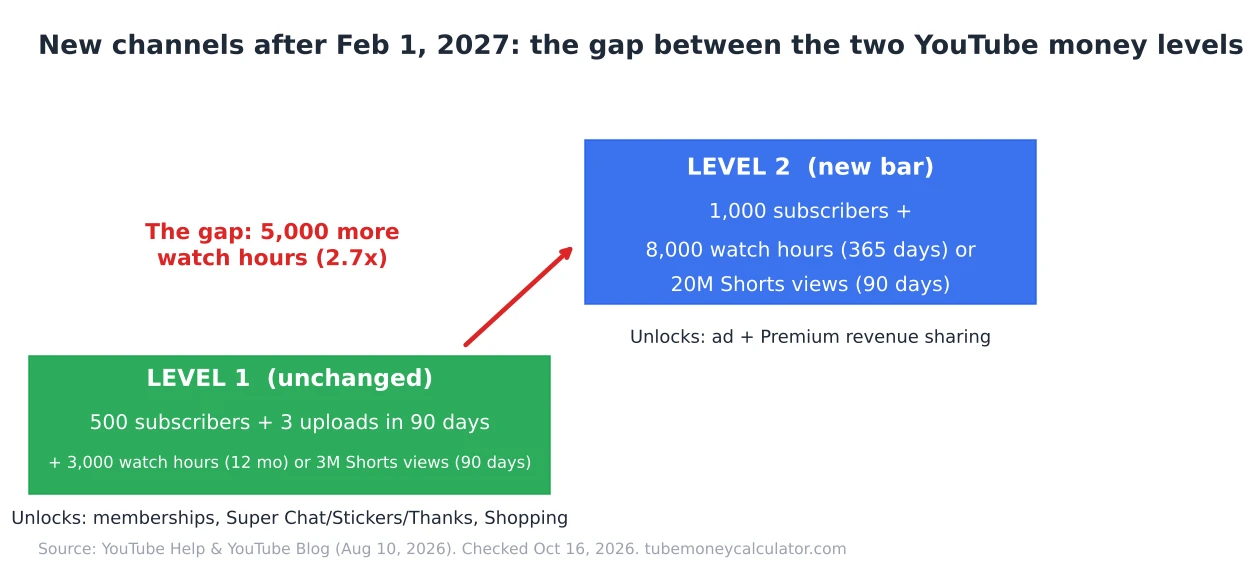
What actually changes on February 1, 2027
Everything below comes from YouTube’s own announcement, New opportunities to earn and changes to the YouTube Partner Program (August 10, 2026), and the official YouTube Help page on the expanded Partner Program, both checked on October 16, 2026.
- New applicants for ad and Premium revenue sharing will need either 8,000 qualified watch hours in the last 365 days or 20 million qualified Shorts views in the last 90 days.
- Channels already in the Partner Program are not affected by this new entry bar.
- The entry thresholds for fan funding and Shopping are unchanged. YouTube says this directly in the announcement.
- To keep monetizing fully, creators must accept the updated terms in YouTube Studio by January 31, 2027 (YouTube Help: How to earn money on YouTube).
If you want the full rundown of every change, read our earlier post, YouTube Partner Program Changes in February 2027. This article focuses on one thing: how to earn something in the gap.
The two money levels, side by side
Think of the Partner Program as two floors of the same building.
| Level 1: Fan funding + Shopping | Level 2: Ads + Premium | |
|---|---|---|
| Subscribers | 500 | 1,000 |
| Recent uploads | 3 public uploads in the last 90 days | — |
| Watch time route | 3,000 watch hours in 12 months | 8,000 watch hours in 365 days (new applicants from Feb 1, 2027) |
| Shorts route | 3 million Shorts views in 90 days | 20 million Shorts views in 90 days (new applicants from Feb 1, 2027) |
| What it unlocks | Channel memberships, Super Chat, Super Stickers, Super Thanks, YouTube Shopping | Ad revenue (55% long-form / 45% Shorts share) and YouTube Premium and Premium Lite revenue |
| Changes in 2027? | No | Yes |
Sources: YouTube Help — expanded YPP overview; YouTube Blog, Aug 10, 2026.
Before 2027, the gap between the two floors was 3,000 hours to 4,000 hours, only 1,000 hours apart. Many creators skipped Level 1 because Level 2 was close behind. From February 2027, the gap becomes 5,000 hours. That’s why Level 1 matters much more for new channels now.
Step 1: Work out how far away each level really is
Watch hours are not views. A watch hour is 60 minutes of people watching your public, long-form videos. To turn hours into views, use this simple formula:
Views needed = watch hours × 60 ÷ average minutes watched per view
You can find “Average view duration” in YouTube Studio → Analytics → Overview (or on any single video’s analytics page).
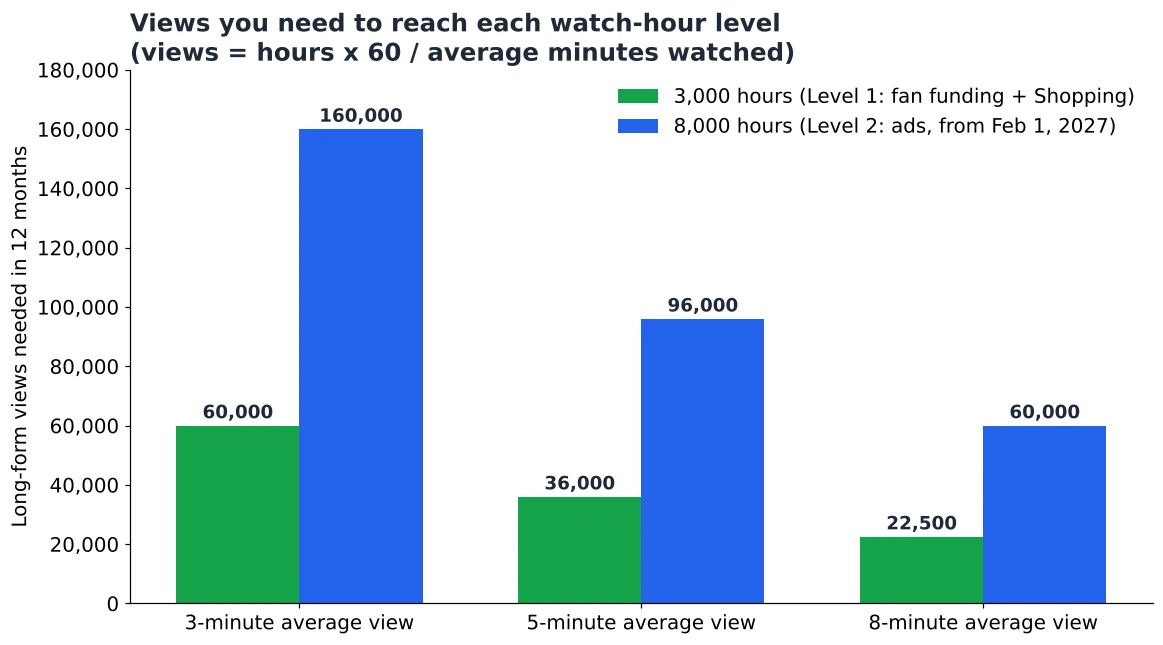
Here’s what that looks like at three common average view durations:
| Average minutes watched per view | Views for 3,000 hours (Level 1) | Views for 8,000 hours (Level 2) |
|---|---|---|
| 3 minutes | 60,000 | 160,000 |
| 5 minutes | 36,000 | 96,000 |
| 8 minutes | 22,500 | 60,000 |
Notice something: raising your average view duration shrinks the mountain faster than anything else. Going from 3 to 5 minutes cuts the views you need for 8,000 hours from 160,000 to 96,000.
Worked example 1: Maya, a US tech channel
Maya makes short phone-setup tutorials in the US. Her videos are under 8 minutes.
- Views per month: 6,000
- Average view duration: 5 minutes
- Watch hours per month: 6,000 × 5 ÷ 60 = 500 hours
Level 1 (3,000 hours): 3,000 ÷ 500 = 6 months. Very reachable.
Level 2 (8,000 hours): Here’s the trap. Watch hours count over a rolling 365 days, so the most Maya can ever have at this pace is 500 × 12 = 6,000 hours. At 6,000 views a month, she never reaches 8,000. She needs at least 8,000 views a month at the same 5-minute average (8,000 × 5 ÷ 60 ≈ 667 hours a month × 12 ≈ 8,000 hours).
What ads would pay her once she qualifies: Using the TubeMoneyCalculator methodology for US Technology, under-8-minute videos:
- Low RPM = $8 CPM × 1.00 (US) × 40% monetized views × 55% creator share = $1.76 per 1,000 views
- High RPM = $22 CPM × 1.00 × 60% × 55% = $7.26 per 1,000 views
- 6,000 views a month → 6 × $1.76 = $10.56 to 6 × $7.26 = $43.56 a month
That’s honest, small money. It also means that Level 1 tools, used well, can match what ads would pay her at this size.
Worked example 2: Daniel, a Canadian cooking channel
Daniel films 8-minute recipe videos for a mostly Canadian audience.
- Views per month: 10,000
- Average view duration: 4.5 minutes
- Watch hours per month: 10,000 × 4.5 ÷ 60 = 750 hours
Level 1: 3,000 ÷ 750 = 4 months. Level 2: 8,000 ÷ 750 ≈ 10.7 months, and his 12-month ceiling (750 × 12 = 9,000 hours) is above 8,000, so he gets there if he keeps his pace.
What ads would pay him once he qualifies (Food & cooking, Canada multiplier 0.85×, 8-minute video length boost 1.5×):
- Low RPM = $4 × 0.85 × 40% × 55% × 1.5 = $1.12
- High RPM = $12 × 0.85 × 60% × 55% × 1.5 = $5.05
- 10,000 views → $11.22 to $50.49 a month
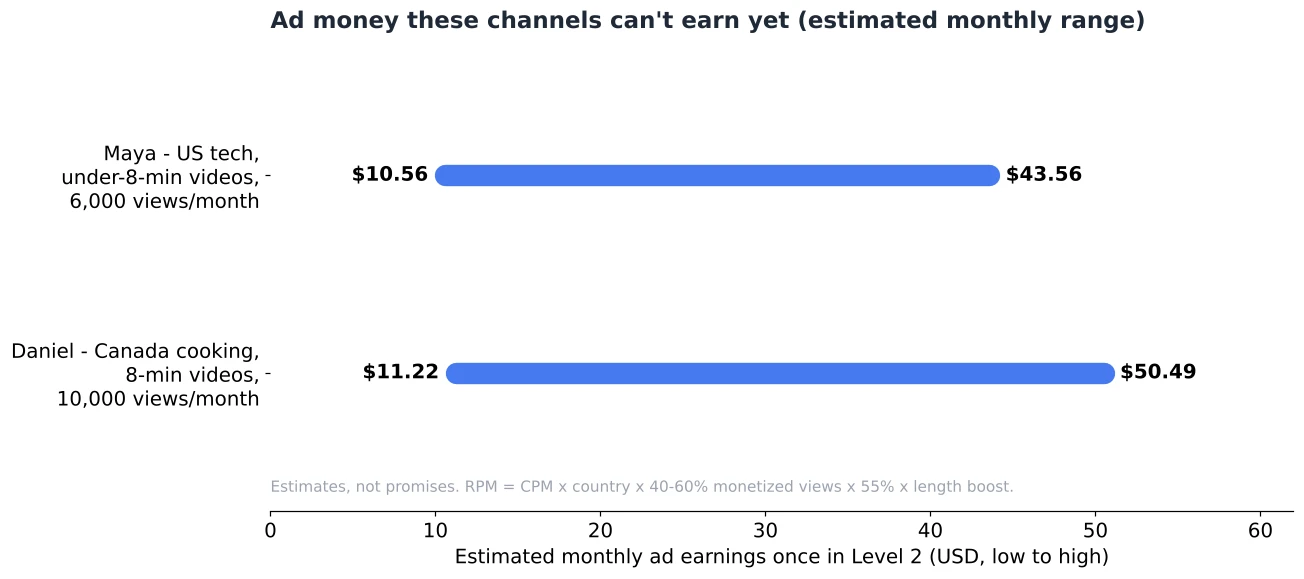
You can run your own numbers in the free YouTube earnings calculator. Pick your niche, country, and video length to see the range for your channel. Remember these are estimates, not promises.
Step 2: Turn on Level 1 money as soon as you qualify
When you hit 500 subscribers, 3 recent uploads, and 3,000 hours (or 3 million Shorts views), apply in YouTube Studio → Earn. Then you’ll need to accept the Commerce Products Module to switch on these features.
Each feature has a few extra rules. According to YouTube Help, you must be 18 or older for memberships, Super Chat/Stickers, and Super Thanks. Memberships and Shopping are not available for channels set as “made for kids.” Both the US and Canada are eligible countries.
Super Thanks (best for long-form channels like Maya’s and Daniel’s)
Super Thanks lets a viewer pay a small tip on any video, and their comment gets highlighted. YouTube says creators get 70% of Super Thanks revenue recognized by Google (YouTube Help: Super Thanks).
Example math (not a prediction): if 8 viewers a month each sent a $5 Super Thanks, that’s $40 × 70% = $28. For Maya, that sits right inside her future ad range of $10.56–$43.56.
How to earn more from it: Mention it once, near the end, when you’ve just solved the viewer’s problem. “If this saved you an hour, a Super Thanks helps me make the next one.” Being specific and grateful works better than begging.
Channel memberships
Members pay monthly for perks. For a small channel, keep perks cheap to deliver: a members-only badge, early access to videos, or a monthly members-only Q&A post. Don’t promise weekly bonus videos you can’t keep up with alone.
Super Chat and Super Stickers
These only work on live streams and Premieres. If you’re comfortable going live, a monthly live Q&A (“Bring me your phone problems”, “Ask me anything about meal prep”) is the easiest place to start.
YouTube Shopping (your products or affiliate products)
Shopping uses the same 500-subscriber thresholds listed above (YouTube Help). You can tag your own products or join the affiliate program and tag other brands’ products. You earn a commission when viewers buy.
Example math (not a prediction): if a product you tag paid a $4 commission and 10 viewers a month bought through your tag, that’s $40. Commission rates differ by product, so check the rate shown in Studio before you build a video around it.
Shopping works best when the product is the video. Daniel could tag the pan he uses in a recipe. Maya could tag the phone case she’s reviewing. Tagging random items rarely sells anything.
Step 3: Use brand deals (no YouTube level needed)
You don’t need to be in the Partner Program to work with a sponsor directly. YouTube’s only rule is to disclose it: tick “My video includes paid promotion” (shown in Studio as branded content) in the video details (YouTube Help: Paid product placements). In the US, the FTC also expects clear disclosure, so say it out loud in the video as well.
YouTube’s own brand-matching tool, Creator Partnerships in Studio, needs you to be in the Partner Program, be 18+, live in an eligible country (the US and Canada are on the list), and have no active Community Guidelines strikes (YouTube Help: Creator Partnerships). The page doesn’t say whether Level 1 members count, so check the tab in your Studio once you’re in.
For a small solo channel, a realistic first brand deal looks like this:
- Make a simple one-page media kit: who watches (country, age from Analytics), average views per video, and your 3 best videos.
- List 10 small brands whose products you already use and show on camera.
- Email them one short, specific idea (“a 60-second segment showing your knife in my weekly meal-prep video”).
- Ask for free product plus a small fee, or offer a test video. Small channels often start with product-only deals, and that’s normal.
Step 4: Keep climbing toward 8,000 hours
While Level 1 money comes in, keep your eye on Level 2. The fastest levers for a one-person channel are:
- Raise average view duration. Cut slow intros, show the result in the first 15 seconds, and keep promises in the title. From the table above, this is the biggest lever.
- Make slightly longer videos only when the topic needs it. An honest 9-minute guide beats a stretched 12-minute one.
- Post on a pace you can keep for a year. Watch hours are rolling. A month off can drop hours out of your 365-day window.
- Check your 12-month ceiling every month: monthly watch hours × 12. If it’s under 8,000, your current pace won’t get you there. You need more views or longer watch time.
For a full plan, see our guide on how long it takes to get 8,000 watch hours.
Please avoid shortcuts. Sub-for-sub groups, bought views, and re-uploaded content break YouTube’s policies and can get your application rejected. They also attract viewers who never buy, tip, or join.
What about YouTube’s new “incentives”?
In the same announcement, YouTube mentioned new incentive programs: bonuses for YouTube Shopping, incentives for brand deals, and earnings boosts for starting and growing trends. As of October 16, 2026, YouTube has only said “We’ll share more details soon.” Amounts, rules, and who qualifies have not been announced yet. Be careful with any video or post that claims to know the numbers.
FAQ
Can I make money on YouTube with 500 subscribers in 2027?
Yes, if you also have 3 public uploads in the last 90 days plus 3,000 watch hours in 12 months (or 3 million Shorts views in 90 days). That unlocks fan funding and Shopping. Ad revenue still needs Level 2.
Does the 8,000-hour rule apply to the 500-subscriber level?
No. YouTube says fan funding and Shopping entry thresholds are unchanged. The 8,000-hour bar is for new applicants to ad and Premium revenue sharing.
If I join Level 1 before February 1, 2027, do I get ads under the old 4,000-hour rule later?
YouTube hasn’t said that joining Level 1 early locks in the old ad rule. The protection it describes is for creators already in the Partner Program. If you’re close to 4,000 hours now, read Should You Apply Before February 1, 2027?
Do I need to be monetized to do sponsorships?
No. You can work with brands at any size. Just disclose it using the paid promotion setting and say it in the video.
Will Level 1 earnings be bigger than ads?
Usually not at large sizes. But at small sizes, a few Super Thanks or affiliate sales can match the $10–$50 a month that ads might pay a channel with 6,000–10,000 monthly views.
Your next step
Open YouTube Studio → Earn today and look at your progress bars. Write down your monthly watch hours and multiply by 12. If it’s above 3,000, you’re on the road to Level 1. Get your Super Thanks message and one Shopping-friendly video ready now. Then use the earnings calculator to see what your views could pay once you reach 8,000 hours. That way you know what you’re working toward.
All rules in this article were checked on official YouTube pages on October 16, 2026. YouTube may update details before February 2027, so always check the linked pages.