You open YouTube Studio and your Shorts say 13 million views in the last 90 days. You relax. The new rule needs 10 million, so you’re safe, right?
Then you click into Advanced Mode, and a second number appears: “engaged views.” It’s much lower. Now you don’t know which number YouTube will use on February 1, 2027, or which one to type into an earnings calculator.
Short answer: the big public view count is not the one that decides your money. Since August 24, 2026, YouTube counts a public view from the very first frame of playback. But your earnings are still based on engaged views and engaged watch hours, and your eligibility for the Partner Program (including the new 2027 thresholds) is based on qualified views and watch hours. If you plan around the public counter, you can think you’re over a line you haven’t actually crossed.
This article explains the three numbers in plain English, shows you exactly where to check the one that counts, and walks through three worked examples with real math.
What changed on August 24, 2026
YouTube changed how it counts the public view number you see under every video. According to its Help Center, “Beginning August 24, 2026, views are counted the moment a video starts to play across all formats” (YouTube Help: How engagement metrics are counted). That covers Shorts, long videos and livestreams.
Before this, a long video needed some watch time before it counted as a view. Now a short autoplay on the home page can count as a view, even if the person scrolls past after a second.
YouTube’s own explainer says a view now counts “from the very first frame,” while an engaged view means the viewer clicked to watch or kept watching past the opening seconds (YouTube Official Blog: Engaged views explained).
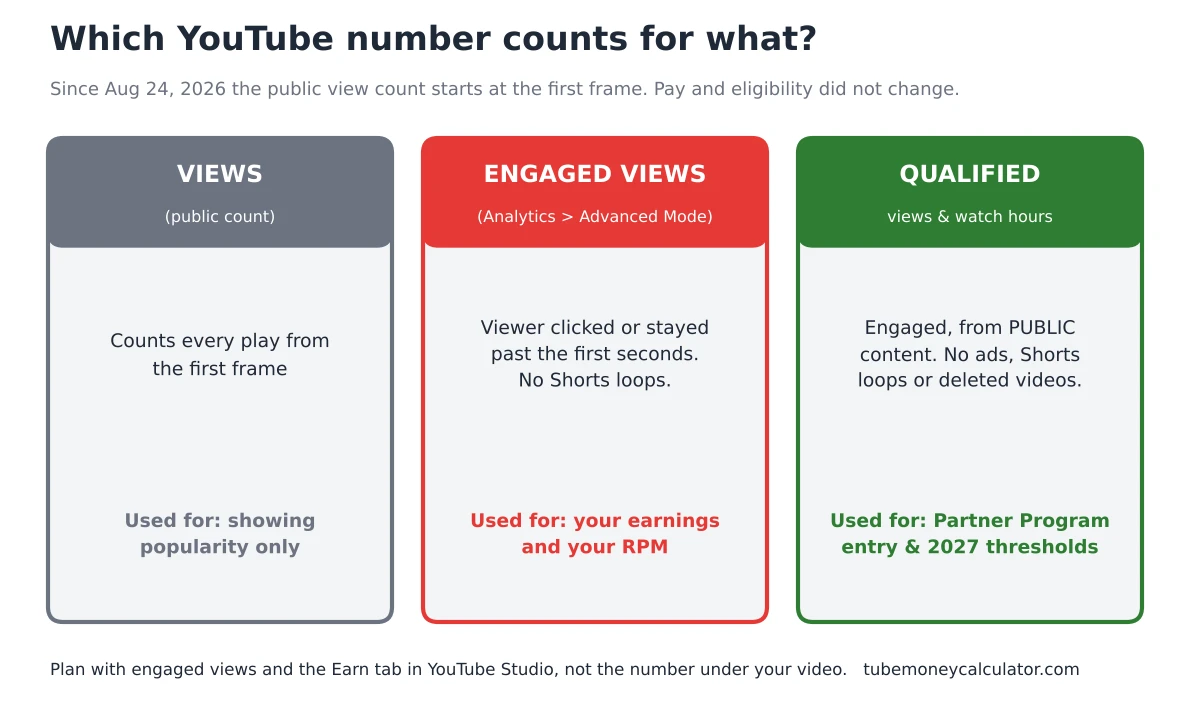
The important part for your wallet is in the same Help page: “This update won’t impact your YouTube Partner Program (YPP) earnings or eligibility.” Earnings stay tied to engaged views and engaged watch hours. Eligibility stays tied to qualified views and qualified watch hours.
So the public number got bigger. The money did not.
The three numbers, in plain English
Here is the simplest way to keep them apart.
| Number | What it counts | Where you see it | What it’s used for |
|---|---|---|---|
| Views (public count) | Every time a video starts playing, from the first frame | Under every video, and in Studio | Showing popularity. Not used for pay or eligibility |
| Engaged views | Views where the viewer clicked to watch or stayed past the first few seconds (loops don’t count for Shorts) | YouTube Analytics, Advanced Mode | What your earnings are based on |
| Qualified views / watch hours | Engaged Shorts views and long-form watch hours from public content, minus things like ad views and deleted videos | The Earn tab in YouTube Studio shows your progress | Partner Program eligibility, including the 2027 thresholds |
A few details from YouTube’s definitions are worth knowing (YouTube Official Blog: qualified watch hours and Shorts views):
- Qualified Shorts views are engaged views on public Shorts. Loops don’t count. Image posts in the Shorts feed don’t count. Shorts watched as ads don’t count.
- Qualified watch hours come from public long-form videos (including podcasts) and archived livestreams. Shorts watch time doesn’t count. Watch time from ads doesn’t count. Private, unlisted and deleted videos don’t count.
- Deleting a video removes its views and hours from your total. If you’re close to a line, think twice before you clean up old uploads.
Why this matters more after February 1, 2027
The 2027 Partner Program changes are all built on qualified numbers, not public ones. Here is what YouTube announced (YouTube Official Blog: Partner Program updates for 2027):
- Shorts revenue sharing: starting February 1, 2027, a channel needs 10 million qualified Shorts views in the last 90 days to earn ad and subscription revenue on Shorts. Channels below that stay in the Partner Program and keep earning on long-form. Shorts pay resumes automatically if you go back over 10 million.
- New applicants for ad and Premium revenue need 8,000 qualified watch hours in the last 365 days or 20 million qualified Shorts views in the last 90 days. Existing members are not affected by this new entry bar.
- Fan funding and shopping entry thresholds are unchanged.
- YouTube mentioned new incentives for channels under the Shorts threshold (shopping bonuses, brand-deal incentives, trend boosts). Details are not announced yet.
YouTube’s current Partner Program help page also says creators must accept the updated terms in YouTube Studio by January 31, 2027 to keep full monetization (YouTube Help: YPP overview and eligibility).
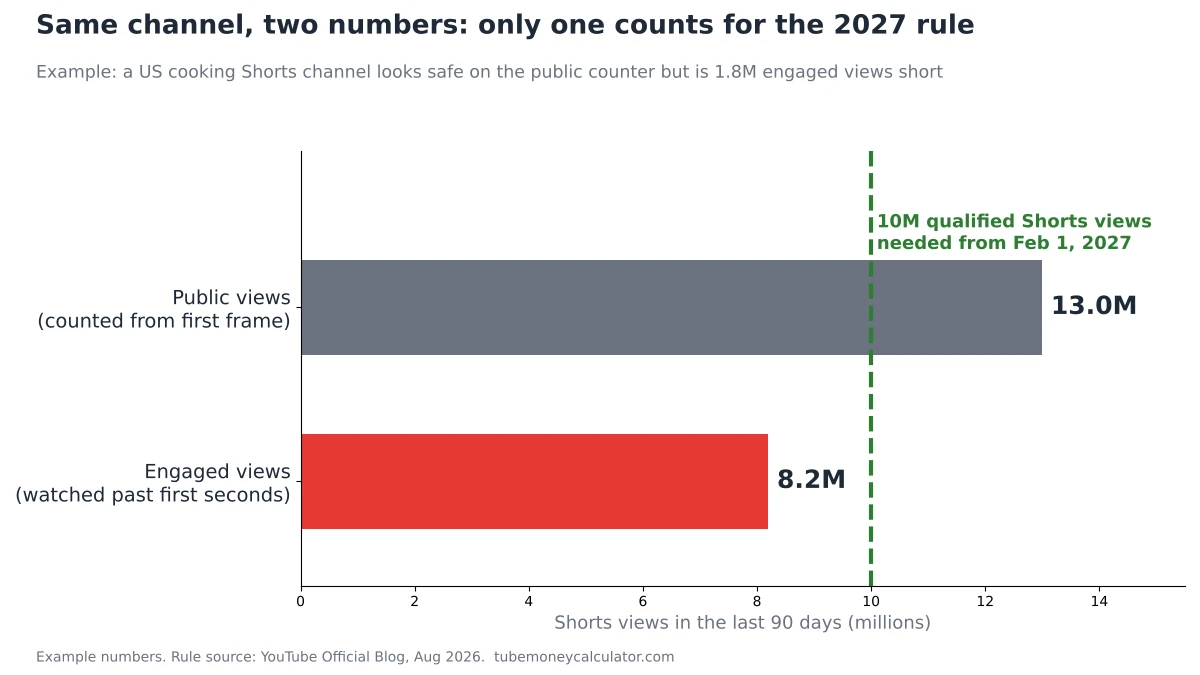
The word that keeps showing up is qualified. If your public Shorts counter says 13 million but your engaged views say 8 million, you are below the 10 million line.
How to check the number that actually counts (step by step)
Do this once now, then once a month until February.
- Open YouTube Studio on a computer.
- Click Analytics in the left menu.
- Click Advanced Mode (top right).
- Set the date range to Last 90 days for Shorts, or Last 365 days for watch hours.
- Filter the content type to Shorts (for the 10 million and 20 million rules) or Videos (for watch hours).
- Add the Engaged views column if it isn’t showing. For long videos, look at Watch time (hours).
- Now open the Earn tab in Studio. If you are not in the program yet, this shows your progress toward eligibility. Treat this as the final word, since it’s YouTube’s own count of qualified numbers.
- Write the number in a notebook or spreadsheet with today’s date. Comparing month to month tells you more than any single day.
Worked example 1: the Shorts creator who thinks she’s safe
Maya runs a cooking Shorts channel from Ohio. She is already in the Partner Program. These are example numbers, not a real channel.
- Public Shorts views, last 90 days: 13,000,000
- Engaged Shorts views, last 90 days: 8,200,000
Step 1: Which number counts? The engaged one. 8,200,000 is below 10,000,000. If nothing changes, Maya stops earning Shorts revenue from February 1, 2027. She stays in the program and still earns on her long videos.
Step 2: How big is the gap?
10,000,000 − 8,200,000 = 1,800,000 engaged views short.
Spread over 90 days: 1,800,000 ÷ 90 = 20,000 extra engaged views per day.
Step 3: What does that mean per Short? Maya posts 5 Shorts a week. In 90 days that’s about 90 ÷ 7 × 5 ≈ 64 Shorts.
- Today: 8,200,000 ÷ 64 ≈ 128,000 engaged views per Short
- Needed: 10,000,000 ÷ 64 ≈ 156,000 engaged views per Short
That’s about 22% more engaged views on every Short, every week, for three months straight. Possible for some channels. Not something to count on.
Step 4: What is the Shorts money worth? Using the US Shorts rate from our methodology page ($0.03 to $0.15 per 1,000 views, already the creator’s share):
- Low: 8,200,000 ÷ 1,000 × $0.03 = $246 per 90 days
- High: 8,200,000 ÷ 1,000 × $0.15 = $1,230 per 90 days
That’s the amount at stake. It helps Maya decide calmly. If her long videos earn much more than this, she may be better off putting her extra hours into long-form rather than chasing the Shorts line. We go deeper on that choice in What the 10 million Shorts views rule means for small channels.
Worked example 2: why your calculator estimate might look too high
Here’s a mistake that is easy to make now: typing the public view count into an earnings calculator.
Say you run a US food channel with long videos (8+ minutes). This month:
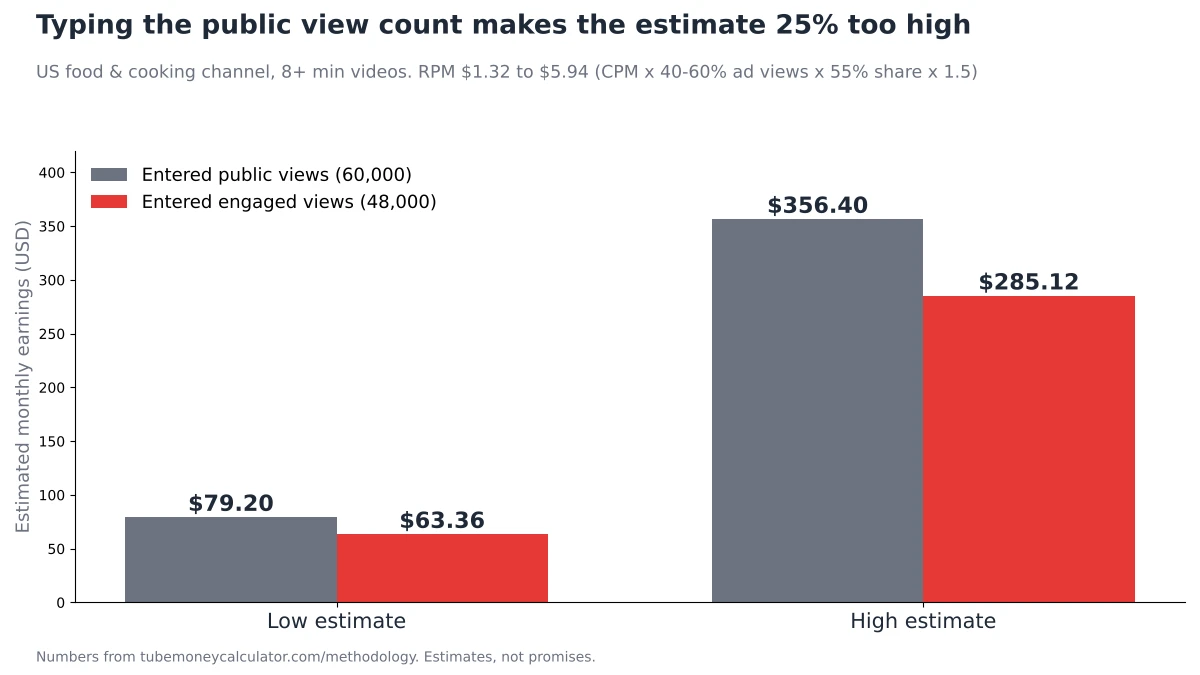
- Public views: 60,000
- Engaged views: 48,000
Our calculator’s RPM range for food and cooking, US audience, 8+ minute videos works like this (all numbers from the methodology page):
- Low RPM: $4 CPM × 1.00 (US) × 40% of views with ads × 55% creator share × 1.5 (8+ min) = $1.32
- High RPM: $12 CPM × 1.00 × 60% × 55% × 1.5 = $5.94
Now run both view numbers:
| Views you enter | Low estimate | High estimate |
|---|---|---|
| 60,000 (public count) | 60 × $1.32 = $79.20 | 60 × $5.94 = $356.40 |
| 48,000 (engaged views) | 48 × $1.32 = $63.36 | 48 × $5.94 = $285.12 |
Using the public count makes the estimate 25% too high (60,000 ÷ 48,000 = 1.25). Not because the calculator changed, but because the input did.
The fix: when you use the TubeMoneyCalculator Earnings Estimator, enter your engaged views from Advanced Mode, not the public number under your video.
The same trap with your own RPM
The same thing happens if you work out your RPM by hand. Say that channel earned $150 this month:
- $150 ÷ 60,000 × 1,000 = $2.50 (using public views)
- $150 ÷ 48,000 × 1,000 = $3.13 (using engaged views)
YouTube’s help page says RPM “is calculated per 1,000 engaged views” (YouTube Help: Understand ad revenue analytics). So if your hand-made RPM suddenly looks lower since late August, check your math before you panic. You may be dividing by the bigger number. Our guide to YouTube RPM explains the rest of what goes into RPM.
Worked example 3: the new channel chasing 8,000 watch hours
Jordan is a gaming creator in Toronto. He’s not in the Partner Program yet and plans to apply in 2027, so the 8,000-hour bar applies to him. Example numbers:
- Public views on long videos, last 365 days: 52,000
- Engaged views on long videos, last 365 days: 40,000
- Average view duration: 9 minutes
Watch hours estimate: 40,000 × 9 ÷ 60 = 6,000 hours.
The 12,000 extra public views look nice, but views that end after a second add almost no watch time. YouTube hasn’t published how much time from those short starts lands in qualified hours, so don’t count on it. Trust the hours number on your Earn tab.
The gap: 8,000 − 6,000 = 2,000 hours.
At a 9-minute average: 2,000 × 60 ÷ 9 ≈ 13,300 more engaged views within the same 365-day window.
Two ways Jordan can close it:
- Raise watch time per view. If his average goes from 9 to 11 minutes, the same 40,000 engaged views give 40,000 × 11 ÷ 60 ≈ 7,330 hours. Better intros, clear chapters and cutting slow parts all help.
- Get more engaged views. Titles and thumbnails that earn real clicks matter more now, because a click is what turns a view into an engaged view.
For a full timeline, see How long it takes to get 8,000 watch hours.
What to do with this (a simple plan for solo creators)
- Stop watching the public counter for business decisions. Enjoy it, but plan with engaged views and the Earn tab.
- Do the monthly check from the steps above, and write the numbers down.
- Work out your ratio. Engaged views ÷ public views. Maya’s is 8.2 ÷ 13 ≈ 63%. A rising ratio means people who see your videos are choosing to watch.
- Improve the first few seconds. For Shorts, the opening is what turns a view into an engaged view. Start with the result or the question, not a logo or a “hey guys.”
- Don’t delete old public videos if you’re near a threshold. Deleted content no longer counts.
- Never buy views or use view bots. They break YouTube’s rules, they won’t build the engaged views that count, and they can cost you your place in the program.
- Be honest with brands. If you pitch sponsors, share engaged views too. Brands are learning to ask for them, and showing them first builds trust.
- Accept the updated terms in YouTube Studio before January 31, 2027 if you’re already a partner.
FAQ
Did the August 2026 view count change cut my YouTube pay?
YouTube says no. Its Help Center says the update “won’t impact” Partner Program earnings or eligibility. Earnings stay based on engaged views and engaged watch hours. If your hand-made RPM looks lower, you may be dividing by the new, bigger view count.
Does the 10 million Shorts rule use public views or engaged views?
It uses qualified Shorts views, which are engaged views on public Shorts. Loops, image posts, Shorts shown as ads and deleted Shorts don’t count. Check the Earn tab and the Engaged views column in Advanced Mode.
Are engaged views the same as views for long videos?
Not exactly. YouTube’s explainer says a long video that starts from a hover autoplay counts as a view but only becomes an engaged view if the person clicks or keeps watching past the opening seconds.
Which number should I put into an earnings calculator?
Your engaged views. Calculators like ours turn views into money using an RPM, and YouTube calculates RPM per 1,000 engaged views. Using the public count will push the estimate too high.
Can I still trust earnings estimates for other people’s channels?
Be more careful than before. Tools that guess earnings from public view counts are now starting from a bigger number than the one YouTube pays on. Treat those figures as a rough upper range.
Your next step
Open YouTube Studio today, switch Analytics to Advanced Mode, and write down your engaged views for the last 90 days (Shorts) and your watch hours for the last 365 days (long videos). Then put your engaged views into the TubeMoneyCalculator Earnings Estimator to see a realistic range. Want to know how the estimate is built? It’s all on the How it works page.
These numbers are estimates, not promises. But planning with the right number is the difference between a calm February and a surprised one.